Tasking
OroraTech offers a REST API to task the FOREST-2 satellite. The API allows users to request the acquisition of satellite imagery for a given area of interest (AOI) and time frame. The API is designed to be used by developers and data scientists to automate the tasking process and retrieve the results asynchronously.
Tasking is currently experimental and is only available to select users with a limited quota. To get access to the tasking API, please get in touch with the sales team.
Two tasking modes are currently supported:
- Simple Tasking, recommended for non-critical tasking operations
- Manual Window Tasking, recommended for fine-grained control over the tasking window
Simple Tasking
Simple tasking is a straightforward way to request a tasking operation without the need to manually select a tasking window. This mode is recommended for non-critical tasking operations, where the exact time of the acquisition is not important.
Submit a task
To submit a task, use the /v1/satellites/:id/task/ endpoint.
The id parameter is the NORAD ID of the satellite to be tasked.
The JSON payload should contain the following fields:
area: the area of interest (AOI) in WKT formatoverpass_time: the preferred overpass time of the satellite during the acquisitionpreference: the preference for image acquisition. This can be eitherearliestorbest_swath. Refer to the Preference section for more informationsatellite_id: the NORAD ID of the satellite
If the task order was successful for the given window, the API will return an object containing the booking ID, which can be used to retrieve the task status and results.
Preference
In simplified mode, the user can request a preference for the image acquisition:
earliestthe satellite will attempt to acquire the image as soon as possible from the givenoverpass_timeonwards, regardless of the off_nadir anglebest_swaththe satellite will attempt to acquire the image with the best swath width, which may result in a later acquisition time
Manual Tasking
Manual tasking involves two operations:
- retrieving a list of available windows
- submitting a task for a specific window from the list
Manual tasking should be used over Simple Tasking whenever a fine-grained control over the tasking window is required, along with the more detailed choice of the target time frame.
Retrieve available windows
To retrieve the available windows for a given area of interest (AOI) and time frame, use the /v1/satellites/availability/ endpoint.
The area parameter is required and needs to be either a Point or a Polygon in WKT format, representing the AOI.
The start_time and end_time parameters are optional and will default, if not provided, to a window of 7 days from the current date.
Tasking window structure
Tasking windows are returned as a list of objects, each containing the following fields:
cost: the cost in credits for the operation, which will be deducted from the account balance upon successful taskingcoverage: percentage of the AOI covered by the windowimaging_duration_s: the duration of the imaging operation in secondsoff_nadir_angle_deg: the off-nadir angle of the satellite during the acquisition. A higher value indicates a more oblique orientation of the satellite during imaging and may affect the image qualityoverpass_time: the predicted time of the satellite's overpass during the acquisition. This is the middle of the imaging windowsatellite_id: the NORAD ID of the satellitesatellite_name: the official name of the satellitestatus: the status of the window
The supported statuses of each window are:
available: the window is available for taskingunavailable: the window is not available for tasking (typically due to the satellite being busy with other tasks or in maintenance)imaging_already_requested: the window has already been requested by the user
Submit a tasking window
Once a window has been selected, a task can be submitted using the /v1/satellites/:id/window/ endpoint.
All fields returned by the availability endpoint are required as part of the payload for the tasking operation.
If the task order was successful for the given window, the API will return an object containing the booking ID, which can be used to retrieve the task status and results.
Credits
Every tasking operation costs the user a certain amount of credits, which are deducted upon submitting a tasking operation. Credits are part of the user's organization account balance and may be shared with other users within the same organization. The cost of each tasking operation is 100 credits by default, but may vary depending on the duration of the imaging window and other parameters.
If booking a tasking window fails, no credits will be deducted from the account balance.
If a tasking operation is unsuccessful, due to the satellite being unavailable or other reasons, the credits will be automatically refunded to the user's account.
If a tasking operation is successful but produces an image of a cloudy region, the credits will not be refunded.
If the user's account balance is insufficient to cover the cost of a tasking operation, the order will be rejected. More credits may be requested by contacting the sales team.
Order information
Information for current and past orders may be retrieve at any given point in time, using the /v1/satellites/orders/my/ endpoint.
The endpoint will return a list of objects, each containing the following fields:
booking_id: the unique identifier of the bookingcompleted_at: the timestamp of the completion of the task. This will benullif the task is still pendingcost: the cost of the task in creditscreated_at: the timestamp of the creation of the taskcreator_id: the user ID of the creator of the taskgeometry: the AOI of the tasking windowid: the internal identifier of the provider task operationoverpass_time: the predicted time of the satellite's overpass during the acquisitionsatellite_id: the NORAD ID of the satellitestatus: the status of the tasking operation. See the Status section for more informationsubscription_id: the subscription ID of the organization
Status
A tasking operation can have the following statuses:
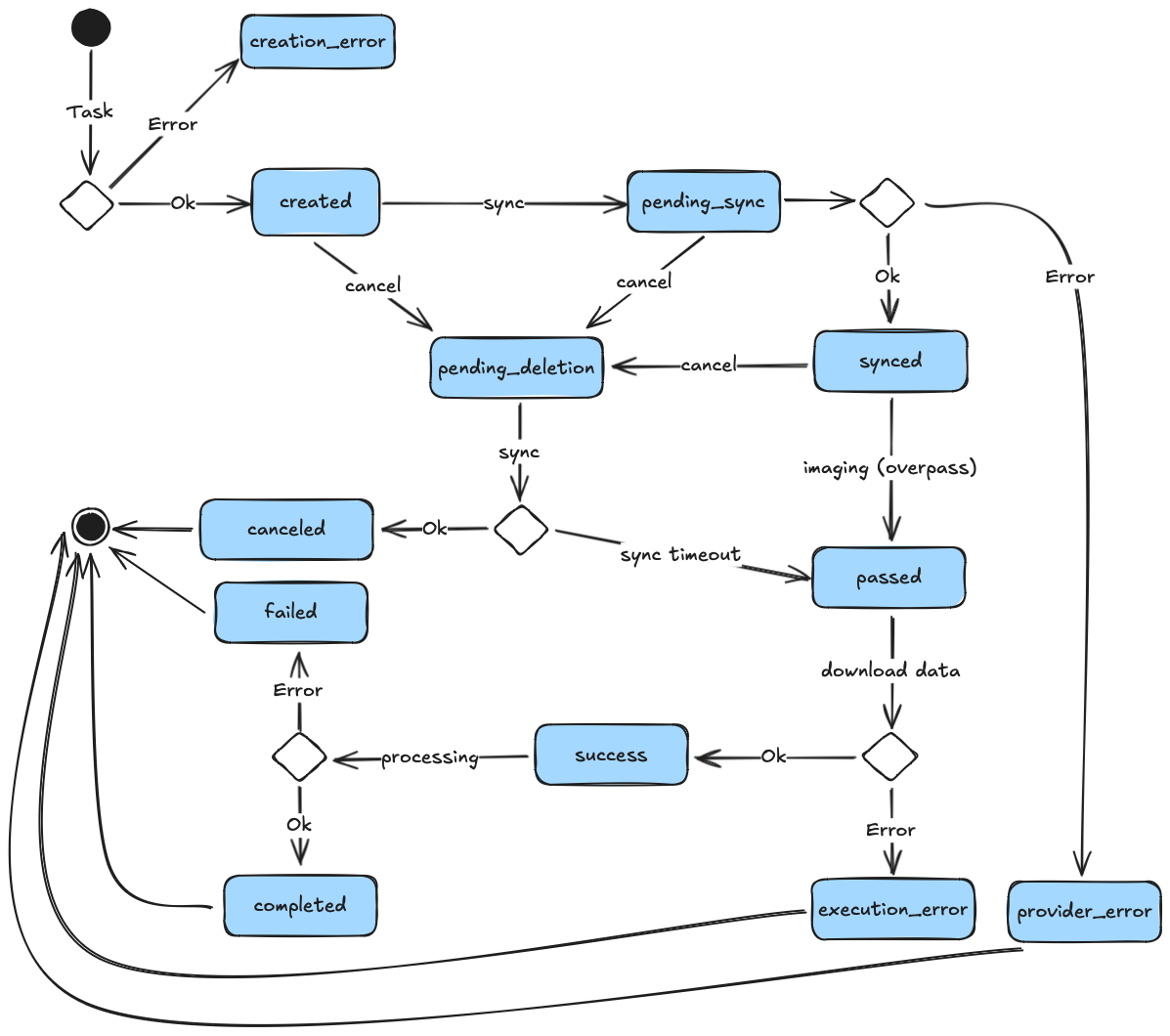
createdthe task has been created on the database but not yet submitted to the satellitecreation_erroran error occurred during the creation of the taskcompletedthe task has been completed successfully and results are availablecanceledthe task was canceld by the userfailedprocessing the satellite data failedpending_syncthe task is pending synchronization with the satellitesyncedthe task has been synchronized and confirmed by the satellitepending_deletionthe task was canceled by the user and is pending deletion on the satellite. Refer to the Time frame section for more info about limitationspassedthe overpass time of the task has passed and confirmation of the imaging operation is pendingsuccessthe imaging operation was successful, results will be processed and made available shortlyexecution_errorthe task failed during execution, for example due to a satellite errorprovider_errorthe task couldn't be synchronized due to an error on the provider side
The diagram below shows the typical lifecycle of a tasking operation:
Results
Once a task has been completed without any errors, the results array will also be contained within a response object. Each result contains the following information:
file_name: the name of the original image filename, downloaded from the satellitesatellite_product_id: the internal identifier of the satellite product (i.e. the image taken by the satellite)stac_url: the URL to retrieve the satellite image from the OroraTech STAC catalog
To retrieve the results, the recommended way is to use the stac_url to retrieve the cloud-optimized GeoTIFF file from the STAC catalog.
Refer to the STAC guide documentation for more information on how to retrieve the image.
Limitations
Tasking windows are subject to availability and are not always guaranteed. Below is a list of the common limitations.
Time frame
Tasking windows can currently only be booked for the next 7 days. This is because telemetry (TLE) data, which is used to predict the satellite's position, is less accurate after this time frame.
Additionally, submitted tasks need to be uploaded to the respective satellite in order to be executed. This procedure can take up to 48 hours.
It is recommended to submit tasks at least 48 hours before the desired acquisition time, to have a virtual guarantee of it being executed.
There is no guarantee that a task will be executed, if the submitted window is scheduled less than 48 hours before its due acquisition time. Tasking very shortly before the acquisition time is not recommended and will typically fail.
Bandwidth
A window may be rejected if the satellite's bandwidth is fully saturated for a specific time frame. This is independent of the AOI and depends solely on the amount of already scheduled tasks.
When requesting availability, the API will take current bandwidth into account and return the available windows accordingly. If an available window is tasked and rejected by the server, it may be because another window was booked for the same time frame and the bandwidth limitations were exceeded.
Shorter imaging durations lead to less bandwidth usage and are more likely to be accepted.
Task failure
A satellite's operation is subject to various factors, which cannot always be predicted. In some rare cases a task may fail, for example if the satellite needs to undergo unexpected maintenance or if the tasking request was interrupted due to other operational constraints.
STAPI
STAPI (Sensor Tasking API) APIs are planned and will be available at a later stage.