Integrated Incidents
The platform offers API to integrate your own fire incidents and publish the data to the platform. The data will only be visible and accessible to your organization.
This guide will help you to understand how to use the API and how to integrate your data.
To ingest your own fire incidents, you need to have an active monitored area over the region in which you want to ingest the incidents.
Only incidents that took/take place within an active monitored area can be submitted.
Integrate incidents
To integrate incidents, a convenient GET /v1/incidents/integrated/batch/ API is offered. A list of incidents can be submitted in a single request and the API will accordingly create new ones or update existing ones.
For every submitted object, some fields are mandatory, while others are optional.
An example request that submits two incidents at once could look like this:
[
    {
        "external_identifier": "incident_001",          // required
        "geometry": "POINT(11.60295373 48.11982399)",   // required
        "start": "2024-08-19T03:42:00Z",                // required
        "end": "2024-08-19T06:10:00Z",
        "name": "Munich - OroraTech Office",
        "status": "closed",
        "type": "industry"
    },
    {
        "start": "2024-08-22T15:00:00Z",                // required
        "external_identifier": "incident_002",          // required
        "geometry": "POINT(11.77063980 47.70963501)",   // required
        "name": "Tegernsee",
        "status": "dispatched",
        "type": "forest",
        "description": "Fire in the forest near Tegernsee",
        "detection_mode": "phone report",
        "last_activity": "2024-08-23T22:00:00Z",
    }
]
Refer to the full data fields section for more details about the supported data fields.
Depending on whether a submitted incident already exists on our systems or not, it will either be created or updated.
New incidents
If the external_identifier of a submitted object doesn't exist yet on the OroraTech system, the object will handled as a new incident.
Updated incidents
If the external_identifier of a submitted object already exists on the OroraTech system, the object will be handled as an update of the existing incident.
When updating an incident, all passed data fields will overwrite the existing values, EXCEPT for the start timestamp.
The last_activity timestamp follows specific constraints (see below for more information).
Passing an empty value for a data field will clear the existing value, if any.
To prevent existing data fields from being cleared, it is recommended to always include all known data fields in the request, even if they are not intended to be updated.
Cluster association
At any point in time (during creation, update or during the lifetime of the incident), a fire cluster may be associated to the submitted incident. Fire clusters refer to regular fire events detected by the OroraTech system.
This association can happen if both these criteria are met:
- the fire cluster is within 1.5 km of the incident's geometry
- the fire cluster's lifetime overlaps the incident's lifetime with a margin of 24 hours
Supported Data Fields
Every external incident supports the data fields below. Some fields are optional but recommended for a better integration and experience.
External Identifier
The unique identifier of the incident within the external system. This is a generic string field.
The field is required, cannot be changed after creation and must be unique.
Geometry
The geometry in WKT format of the incident. The geometry must be a POINT, a POLYGON or a MULTIPOLYGON.
The geometry is used to represent the location of the incident and may be updated over time. If the set geometry is a point, it will be displayed on the map as a marker (icon). If the geometry is a polygon or multipolygon, it will be displayed as a shape on the map.
The full history of the geometry changes is stored and may be queried later on.
The field is required but can be updated later on.
If the geometry of an incident changes drastically (e.g. the initial geometry was inaccurate), it may be recommended to create a new incident instead of updating the existing one, since existing fire cluster associations will otherwise become invalid.
Start
The reported start time of the incident in ISO 8601 format. This may typically be the time of ignition or the time the incident was reported in the external system.
The field is required and cannot be changed after creation.
End
The reported end time of the incident in ISO 8601 format. This may typically be the time the incident was extinguished or the time the incident was reported as resolved in the external system. The field is optional and may be set later on.
It is recommended to set this field as soon as the incident is resolved, as this will improve end-user experience when querying with time filters.
Last Activity
The last activity time of the incident in ISO 8601 format. This field is optional and may be set arbitrarily. It represents the last time the incident was updated in the external system.
The information is used as a substitute to the end field, in case the incident is not yet resolved, for querying purposes.
The last_activity cannot be set to a time before the start time. However, it can be set to a time after the end time.
If an invalid timestamp is submitted, or if no value is submitted at all,
the system will automatically default back to either the end time (if set) or the start time.
If the incident is still ongoing, it is recommended to set the last_activity field to the current time, to get a more accurate representation of the incident's lifetime.
For example after submitting the following data:
{
    "external_identifier": "incident_123",
    "geometry": "POINT (10.0 20.0)",
    "start": "2024-01-01T15:00:00Z",
    "last_activity": "2024-01-02T06:00:00Z"
}
The incident is considered ongoing and will have a lifespan of 15 hours, from 2024-01-01T15:00:00Z to 2024-01-02T06:00:00Z.
Name
The name of the incident, as assigned by the authorities or the external system.
Setting this field is optional but can help in identifying the incident easier within the UI, instead of relying on numeric identifiers.
Description
A free-text field to describe the incident. This field is optional and can be updated later on.
Status
The status of the incident, as reported by the external system. This field is optional and can be set to any string value.
If the passed value matches one of the states supported within the OroraTech platform, the information will be displayed with the corresponding icon in the UI:
notedfor newly created incidents, still under observationdispatchedresources were dispatched to combat the fireattendedthe fire is actively being suppressedclosedfor resolved incidents
Status updates are saved and can be queried later on within the incident's timeline.
For any other status values than the ones above, no status icon will be displayed for the incident.
Type
The clasification of the incident, as reported by the external system. This field is optional and can be set to any string value.
The OroraTech platform supports several classification types, which can be retrieved from the GET /v1/clusters/types/ endpoint. If the passed value matches one of the supported types, the incident will be displayed with the corresponding icon in the UI.
In the example below, the type is set to forest, which is a supported type on the OroraTech platform, hence it will be displayed with the corresponding icon in the UI:
{
    "start": "2024-08-22T15:00:00Z",
    "external_identifier": "incident_002",
    "geometry": "POINT(11.77063980 47.70963501)",
    "status": "dispatched",
    "type": "forest",
    "last_activity": "2024-08-23T22:00:00Z",
}
For any other type values than the ones above, no type icon will be displayed for the incident.
Cause
The cause of the incident, as reported by the external system. This field is optional and can be set to any string value.
The OroraTech platform supports several cause types, which can be retrieved from the GET /v1/clusters/causes/ endpoint. If the passed value matches one of the supported causes, the information will be displayed with the corresponding icon in the UI.
For any other cause values than the ones above, no cause icon will be displayed for the incident.
Detection Mode
The detection mode of the incident, as reported by the external system. This field is optional and can be set to any string value.
Typical detection modes might be a a report from a citizen, a camera, a drone, or a ground patrol.
Querying Incidents
Integrated incidents can be queried via the GET /v1/incidents/integrated/ endpoint, which will yield a GeoJSON FeatureCollection of incidents integrated by the organization, according to the query parameters. Each returned feature represents a single incident, containing the submitted incident's properties and geometry.
The data is projected in the WGS84 coordinate system (EPSG:4326).
Based on the submitted data, the response may contain features with different geometries, such as points, polygons or multipolygons.
Request Parameters
The following query parameters are supported:
startandendtimestamps to filter incidents that occurred within the given time range- if
startis not specified, it will default to now minus 7 days - if
endis not specified, it will default to now
- if
selectto include specific additional fields in the response. Supported values are:incidentto include all incident properties from the OroraTech system, as well as any fire cluster associationsageto include the age of the incident in seconds, based on the passed date range
All parameters are optional.
Example
To search for the incidents that occurred during a specific week in August 2024, also including information about associated clusters, the following request can be made:
curl -X GET \
    --url 'https://app.ororatech.com/v1/incidents/integrated/?start=2024-08-18T00%3A00%3A00Z&end=2024-08-25T00%3A00%3A00Z&select=incident' \
    -H 'apikey: <my-api-key>'
The above request will yield all integrated incidents that occurrent within the specified time range (i.e. the filter intersects their lifetime given by start and last_activity). The response will also include the incident properties and any associated fire clusters.
An example response:
{
	"features": [
		{
			"type": "Feature",
			"geometry": {
				"type": "Point",
				"coordinates": [
					11.60295373,
					48.11982399
				]
			},
			"properties": {
				"centroid": {
					"lat": 11.60295373,
					"lon": 48.11982399
				},
				"ingested_at": "2024-08-20T03:00:25Z",
				"start": "2024-08-19T03:42:00Z",
				"end": "2024-08-19T06:30:00Z",
				"last_activity": "2024-08-19T06:30:00Z",
				"external_identifier": "incident_001",
				"id": 283,
				"incident": {
					"id": 3840745,
					"source": "user_submitted",
					"monitored_areas": null,
					"name": "Munich - OroraTech Office",
					"type": "fire",
					"cause": "unknown",
					"status": "closed",
					"created_at": "2024-08-19T06:00:00Z",
					"updated_at": "2024-08-20T03:00:25Z",
					"last_viewed": "2024-08-20T03:00:25Z",
					"last_viewer_id": 123,
					"classifications": [
						{
							"user_id": 123,
							"created_at": "2024-08-20T03:00:25Z",
							"updated_at": "2024-08-20T03:00:25Z",
							"type": "industry",
							"cause": "unknown"
						}
					],
					"cluster": {
						"id": 67601274,
						"num_hotspots": 2,
						"centroid": {
						  "lat": 11.60295373,
							"lon": 48.11982399
						},
						"newest_acquisition": "2024-08-19T06:00:00Z",
						"oldest_acquisition": "2024-08-19T06:00:00Z",
						"cluster_confidence": 0.2,
						"is_merged": false
					},
					"status_updates": [
						{
							"user_id": 2835,
							"created_at": "2024-08-20T03:00:25Z",
							"status": "closed"
						}
					],
					"is_updated": false
				},
				"name": "Munich - OroraTech Office",
				"reporter": {
					"id": 123,
					"name": "User A",
					"org_name": "Organization B"
				},
				"status": "closed",
				"type": "industry"
			}
		}
	],
	"type": "FeatureCollection"
}
To fully understand the overlap of an integrated incident with the satellite detections provided by the OroraTech system, it is important to refer to the following timestamps:
startandlast_activity(orend) of the integrated incident (this is the lifetime reported by the external system)newest_acquisitionandoldest_acquisitionof the associated fire cluster (this is the lifetime of the fire cluster)
Other returned timestamps are typically related to the creation and update times of the incident and its metadata.
Map Layer
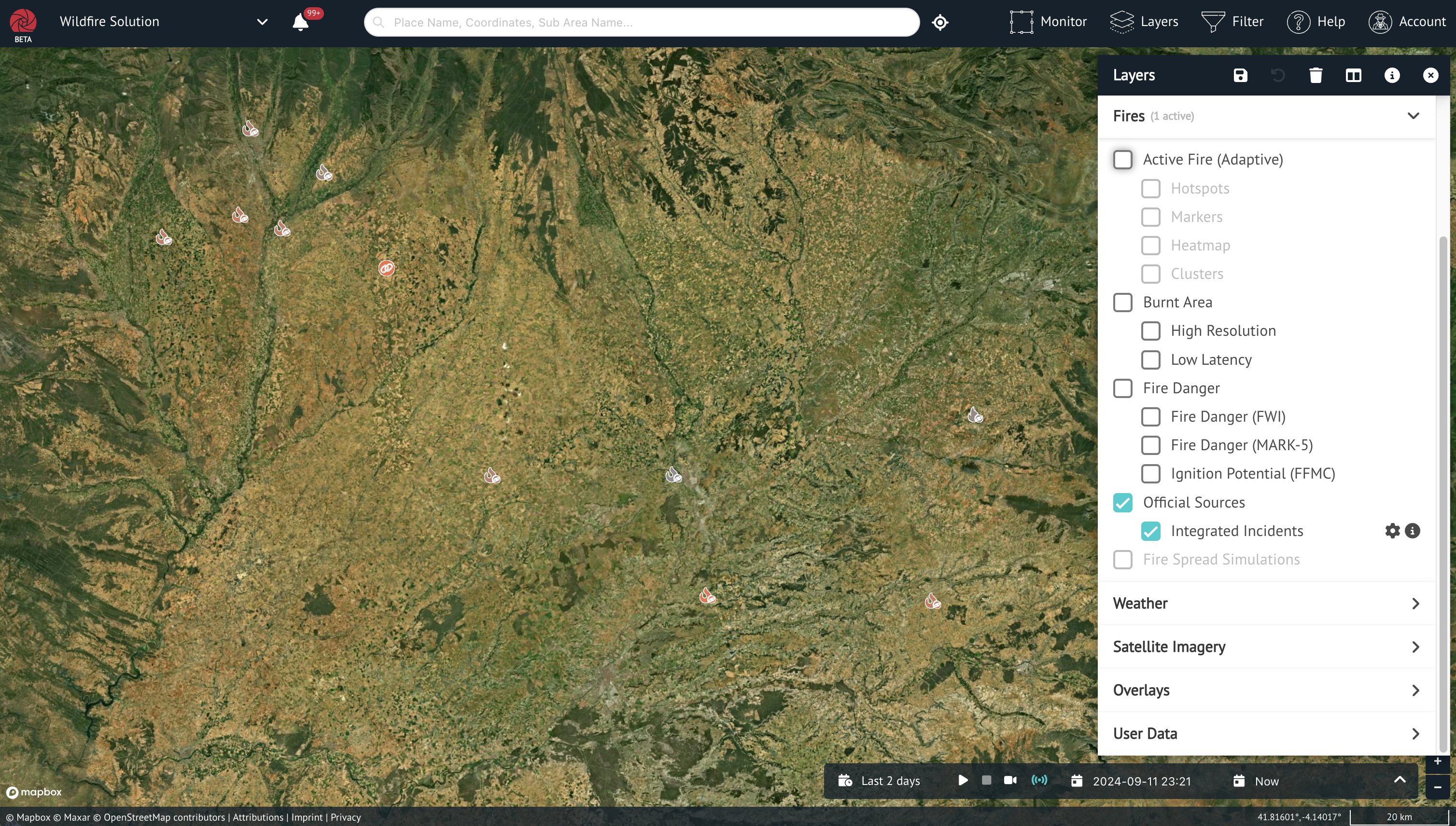
Integrated incidents are visible in the Wildfire Solution UI on the map as a dedicated layer, which can be toggled on and off.
The displayed data is retrieved from the API described above, using the time filter seleced on the UI.