Fire Clusters
A fire cluster represents an incident, characterized by:
- a unique identifier
- a start and end date
- an approximate fire perimeter
- metadata and other contextual information
For most API integrations, it is recommended to periodically poll the active fire clusters for a desired area of interest.
The area may either be a geographical bounding box or existing monitored areas (previously submitted by the user).
Endpoints based on a bounding box offer a more flexible way to search for clusters, as they allow to search for clusters within any area. The endpoints based on monitored areas are more convenient if all clusters should be retrieved at once. This may affect performance, depending on the size of the monitored area(s).
Regardless of the area of interest, the server will respond with a GeoJSON feature collection, containing a list of features, where each feature represents a fire cluster.
Search within Bounding-box
The main endpoints to retrieve a list of active fire clusters are:
The difference between the two endpoints is that the first one returns the full computed shape (Polygon/Multipolygon) of each cluster, while the second one returns the centroids (Point) of the clusters.
These endpoints search for fire clusters within a passed bounding box and filter results based on other parameters (a time range, advanced filters etc.).
The endpoint to retrieve cluster shapes is the most commonly used one, as it can provide the full shape of the clusters. The endpoint to retrieve cluster centroids is useful when only the rough location of the clusters is needed.
Search within Monitored Areas
If the user has defined monitored areas, it is possible to search for clusters directly within one's own monitored area, using one of these endpoints instead:
These endpoints do not support bounding box parameters.
The :id of a single monitored area can be retrieved by looking up the personal monitored areas.
It is recommended to look at all monitored areas available to the user in the system and decide whether all of them are of interest to the user or only a specific subset. If only a specific subset is of interest, the endpoint with the :id parameter should be used.
Parameters
Both endpoints accept the same parameters, except for the different search mechanism, based on either a bounding box or an existing monitored area.
Area of interest
When searching within a bounding box, the area of interest is defined by the following parameters:
xmin, the minimum longitudeymin, the minimum latitudexmax, the maximum longitudeymax, the maximum latitude
When searching within a monitored area instead, the area of interest is either defined by:
- the
:idparameter, which is the unique identifier of a monitored area - the
mykeyword in the URL, which indicates that all the user's monitored areas should be considered
If monitored areas are shared within an organization, the my keyword will also include all monitored areas shared with the user.
Date range
Time filters are passed to the API as date and minutes parameters, where:
dateis the end dateminutesis the range before the end date, expressed in minutes
For example date=2024-01-15T00:00:00Z and minutes=2880 translates to the following time range:
Jan 14th 2024 00:00 UTC - Jan 15th 2024 00:00 UTC
The following date formats are supported for requests:
- ISO8601 (e.g.
YYYY-MM-DDTHH:mm:ssZ) YYYY-MM-DD-HHmm, whereHHmmis the time expressed in UTC
The passed date range will retrieve detections that were acquired within the specified time range and compute the cluster shape based on those detections. Depending on the passed time range, thhe shape may not represent the actual cluster size for the entirety of its lifetime, nor the most recent one.
EPSG
The supported EPSG codes are:
The epsg parameter defines the coordinate reference system of the bounding box and the feature geometries in the response. The default value is 4326.
The bounding box coordinates are interpreted according to the specified EPSG code. If the bounding box is passed in a different CRS, the results may be incorrect.
Confidence
The confidence parameter is deprecated. Use the fire confidence parameters instead for more accurate filtering.
The confidence parameter filters out clusters below a given confidence threshold. It accepts a value between 0.0 and 1.0.
Fire Confidence
The fire confidence parameters offer a more accurate way to filter clusters based on their assessed likelihood of being an actual fire. The following parameters are supported:
min_fire_confidence: the minimum fire confidence level a cluster must have to be included. Defaults tolow.max_fire_confidence: the maximum fire confidence level a cluster must have to be included. Defaults tovery_high.include_no_fire_confidence: whether to include clusters for which no fire confidence has been computed yet. Defaults totrue.
Fire Confidence values
The accepted values for min_fire_confidence and max_fire_confidence are:
| Value | Description |
|---|---|
insufficient_data | Insufficient data to assess fire confidence |
low | Low likelihood of being an actual fire |
medium | Moderate likelihood of being an actual fire |
high | High likelihood of being an actual fire |
very_high | Very high likelihood of being an actual fire |
Early detections may have a low fire confidence, depending on several factors. Filtering out low confidence clusters can lead to missing early detections!
A low fire confidence score should be interpreted as a heat source that is unlikely to be a fire. Conversely, a cluster with an insufficient_data fire confidence could still indicate a fire that is not yet confirmed due to lack of data.
Type
The type parameter allows to filter out clusters based on their classified type. The supported enumeration values can be retrieved from the GET /v1/clusters/types/ endpoint.
Types follow a tree-like structure, as shown in the image below (taken from the filter menu on the platform UI):
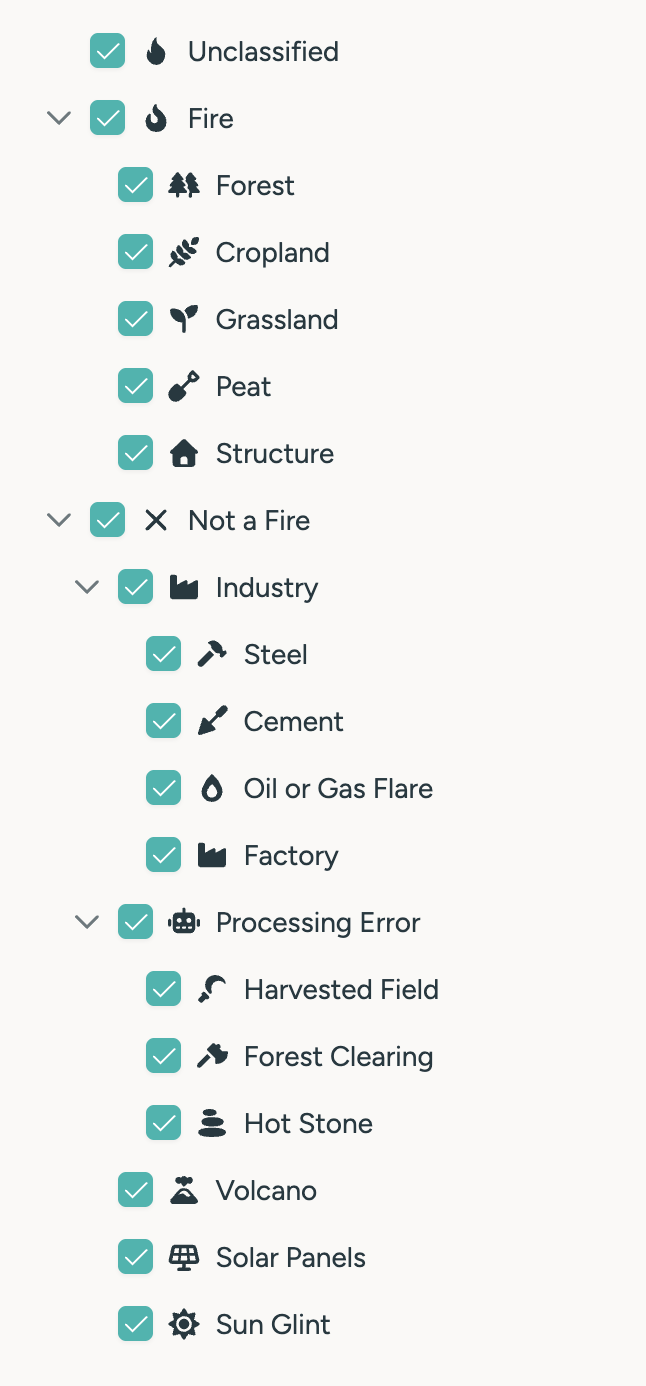
Selecting a type will NOT automatically include its subtypes. For example, selecting 1 will search for all clusters that are classified as fire, but subtypes (e.g. forest) will not be included.
Causes
The cause parameter allows to filter out clusters based on their classified cause. The supported enumaration values can be retrieved from the GET /v1/clusters/causes/ endpoint.
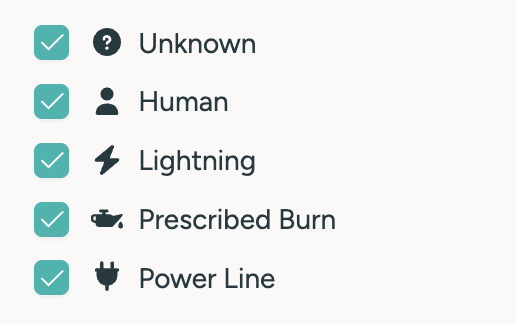
Number of hotspots
The min_fires parameter allows to filter clusters based on the minimum number of hotspots they contain. This parameter is useful to filter out small clusters, which may not be relevant for the use case.
Orbit Type
The orbit_type parameter allows to filter out clusters based on the orbit type of the satellite(s) that detected them. If only LEO detections are relevant, the parameter can be set to LEO. If only GEO detections are relevant, the parameter can be set to GEO.
When the parameter is not set, LEO shapes are computed by default, unless the cluster only contains GEO detections.
Satellites
Allows to include only detections by the specified satellites. This parameter is advanced and only recommended, if specific satellites do not deliver reliable information for the area of interest.
Algorithms
Allows to include only detections by the specified detection algorithms. This parameter is advanced and only recommended, if specific algorithms do not deliver reliable information.
Shape options
By default, whenever a cluster contains detections from multiple satellites, the detections from satellites with lower geolocation accuracy are not considered for the shape computation. This is to avoid the shape being distorted and/or misleading by inaccurate detections.
By passing shape_options=low_accuracy this behavior can be overridden, and the shape will be computed based on all detections.
This parameter is not available for the /v1/clusters/centroids endpoint.
Additionally, the optimized parameter may be passed to the request to receive a more optimistic shape for each cluster. Refer to the shape calculation section for more information.
Select
The select parameter allows to include additional information in the response. The supported values are:
oldest_acquistion: the timestamp of the oldest satellite acquisition for that clusternewest_acquisition: the timestamp of the newest satellite acquisition for that clusteroldest_detection: the timestamp of the oldest hotspot detection by an algorithm for that clusternewest_detection: the timestamp of the newest hotspot detection by an algorithm for that clusterlifetime: the lifetime of the cluster in minutes (last acquisition time - first acquisition time)area, the area of the clustercentroid, includes a centroid object (lat/lon) for each cluster. This parameter is not available for the/v1/clusters/centroidsendpoint.satellites: a comma-separated list of all satellites involved in the detection of the clusteralgorithms: a comma-separated list of all algorithms involved in the detection of the clusterorbit_type: the orbit type of the satellite(s) that detected the cluster. This can only beGEO,LEOorGEO,LEOtypes: a comma-separated list of all types assigned to the clustercauses: a comma-separated list of all causes assigned to the cluster
Multiple select values can be passed as a comma-separated list. See below for a full example.
All the selected values are included in the response as properties of the respective GeoJSON features.
Localization
If localization is set to true, the values and timestamps will automatically be localized based on the user's settings.
Affected properties are:
- all selected timestamps
- the area property
Area Unit
The unit_area parameter allows to specify the unit of the area property in the response. By default this is sqm.
This parameter will override the localization parameter, if both are set.
GeoJSON Feature Collection
The server responds wiht a GeoJSON feature collection payload, containing a list of features, where each feature represents a fire cluster.
The geometry of each feature may either be a Polygon/Multipolygon or a Point, depending on the endpoint used. The image below shows how the geometries of clusters are displayed in the platform UI.

If no clusters were found for the specified parameters, the response will be an empty feature collection.
The following properties are always included for every returned feature:
id: the unique identifier of the clusternum_fires: the number of hotspots that are part of the clusterfire_confidence: the fire confidence value of the cluster, which contains a value from this tableconfidence: (deprecated) the legacy confidence value of the cluster, ranging from0.0to1.0
Additional properties are included based on the passed select parameter.
Examples
Live monitoring
To search for the most recent activity within a specific bounding box:
curl -X GET \
    --url 'https://app.ororatech.com/v1/clusters/?xmin=-120.66710&ymin=36.80301&xmax=-119.07488&ymax=37.77011&minutes=1440&min_fire_confidence=medium&select=oldest_acquisition,newest_acquisition,area,centroid' \
    --header 'apikey: <my-api-key>'
The above request will yield all clusters within the specified bounding box (California) detected/updated within the last 24 hours with a fire confidence of at least medium.
The shape for all detections within the last 24 hours for each cluster will be included. The response will also include the oldest and newest acquisition timestamps, the area and the centroid of each cluster:
{
    "features": [
        {
            "type": "Feature",
            "geometry": {
                "type": "Polygon",
                // Dummy coordinates for the sake of the example.
                // Real shapes are more complex and can be large.
                "coordinates": [
                    [
                        [
                            -120.4293464,
                            37.1159008
                        ],
                        [
                            -120.4200922,
                            37.1188381
                        ],
                        [
                            -120.4159721,
                            37.1143878
                        ],
                        [
                            -120.4280593,
                            37.1082818
                        ],
                        [
                            -120.4293464,
                            37.1159008
                        ]
                    ]
                ]
            },
            "properties": {
                "area": 1192265.2309145192,
                "centroid": {
                    "lat": 37.11520315384615,
                    "lon": -120.42880292307693
                },
                "fire_confidence": "medium",
                "id": 57571571,
                "newest_acquisition": "2024-02-19T04:36:51Z",
                "num_fires": 13,
                "oldest_acquisition": "2024-02-18T09:19:01Z"
            }
        }
    ],
    "type": "FeatureCollection"
}
Historical data
To search for older clusters within the user's monitored areas:
curl -X GET \
    --url 'https://app.ororatech.com/v1/monitored_areas/my/clusters/?date=2023-10-15T18:00:00Z&minutes=10080&select=oldest_acquisition,newest_acquisition,lifetime,area,satellites,algorithms,types' \
    --header 'apikey: <my-api-key>'
The above request will yield all clusters for the monitored area of the user between the dates 2023-10-08T18:00:00Z and 2023-10-15T18:00:00Z, without any confidence filter.
Each cluster's shape will include all relative detections within the specified time frame. The response will also include the oldest and newest acquisition timestamps, the total lifetime in minutes, the types, the satellites and algorithms that detected each cluster:
{
    "features": [
        {
            "type": "Feature",
            "geometry": {
                "type": "MultiPolygon",
                // Dummy coordinates for the sake of the example.
                // Real shapes are more complex and can be large.
                "coordinates": [
                    [
                        [
                            [
                                -119.95205075935871,
                                38.10063088614393
                            ],
                            [
                                -119.95205075935871,
                                38.06432387795169
                            ],
                            [
                                -119.89571092449648,
                                38.06432387795169
                            ],
                            [
                                -119.89571092449648,
                                38.10063088614393
                            ],
                            [
                                -119.95205075935871,
                                38.10063088614393
                            ]
                        ]
                    ],
                    [
                        [
                            [
                                -119.93574185979325,
                                38.11281562498931
                            ],
                            [
                                -119.93574185979325,
                                38.10581612979814
                            ],
                            [
                                -119.92371610556829,
                                38.10581612979814
                            ],
                            [
                                -119.92371610556829,
                                38.11281562498931
                            ],
                            [
                                -119.93574185979325,
                                38.11281562498931
                            ]
                        ]
                    ]
                ]
            },
            "properties": {
                "algorithms": [
                    "MODIS-Collection6-Active-Fire-Product",
                    "OT-AI",
                    "OT-S",
                    "OT-SWIR",
                    "OT-V",
                    "SENTINEL-FRP",
                    "VIIRS-Active-Fire-Product"
                ],
                "area": 44099860.61796448,
                "fire_confidence": "very_high",
                "id": 50094347,
                "lifetime": 68387,
                "newest_acquisition": "2023-11-05T09:37:08Z",
                "num_fires": 13122,
                "oldest_acquisition": "2023-09-18T21:49:47Z",
                "satellites": [
                    "AQUA",
                    "LANDSAT-8",
                    "NOAA-20",
                    "SENTINEL-2A",
                    "SENTINEL-2B",
                    "SENTINEL-3A",
                    "SENTINEL-3B",
                    "SUOMI-NPP",
                    "TERRA"
                ],
                "types": [
                    5
                ]
            }
        }
    ],
    "type": "FeatureCollection"
}
Advanced filtering
To search for clusters with very specific filters, e.g. clusters with:
- high confidence
- not false detections nor industry clusters
- at least 100 hotspots
To search for older clusters within the user's monitored areas:
curl -X GET \
    --url 'https://app.ororatech.com/v1/monitored_areas/my/clusters/?date=2023-10-15T18:00:00Z&minutes=10080&confidence=0.8&type=0,1,5,6,7,8&num_fires=100&select=oldest_acquisition,newest_acquisition,area,types' \
    --header 'apikey: <my-api-key>'
The above request will yield all clusters for the monitored area of the user between the dates 2023-10-08T18:00:00Z and 2023-10-15T18:00:00Z that also match all the above mentioned filters.
Cluster details
The guide described how to search for many clusters with a spatial and temporal filter. For more detailed information about a specific cluster, refer to the GET /v1/clusters/:id/ endpoint. Additional details may include:
- burnt area information
- hotspots
- statistics
- fire confidence
Retrieving details for a specific cluster provides a full overview of that cluster and does not support time filters. The operation is resource-intensive and should be used sparingly.
Fire Confidence
When requesting details for a cluster with the metadata select parameter, the response will include a latest_metadata property, which describes the fire confidence for the cluster.
The object contains several physical and derived values that contribute to the calculation of the fire confidence of that cluster. Here is an example:
{
    ...
    "properties": {
        ...
        "fire_confidence": "very_high",
        "latest_metadata": {
            "cluster_id": 74535047,
            "fire_confidence": "very_high",
            "fwi": 75.04,
            "ffmc": 255,
            "dmc": 275,
            "landcover_can_burn": 1,
            "sum_frp_overpass": 4786.7,
            "geo_persistence": 39,
            "satellite_count": 16,
            "sensor_algorithm_count": 12,
            "landcover_distribution": {
                "510": 0.554,
                "520": 0.0432,
                "530": 0.4029
            },
            "max_nfrp": 1552.8944,
            "fire_intensity_ff": 59.17979,
        },
        ...
    }
}
The fire_confidence field contains a value from the table above. The fire confidence calculation uses an advanced approach to determine the likelihood that a cluster is actually a fire, taking into account a combination of physical and derived indicators.
More details about how the fire confidence metric is computed are available on the dedicated Help Center section.
Best practices
For API integrations that rely on polling data periodically, it is recommended to consider the following aspects to ensure a good tradeoff between performance and accuracy.
Request flow
Querying for active fires is typically a multi-step process:
- Search for new/updated clusters within the area of interest
- Compare the
latest_detectiontimestamps with previously stored data to identify clusters that have new information associated to them- clusters that weren't updated since the last query can be omitted from further processing
- Optionally retrieve additional details for the new/updated clusters
- see cluster details for more information
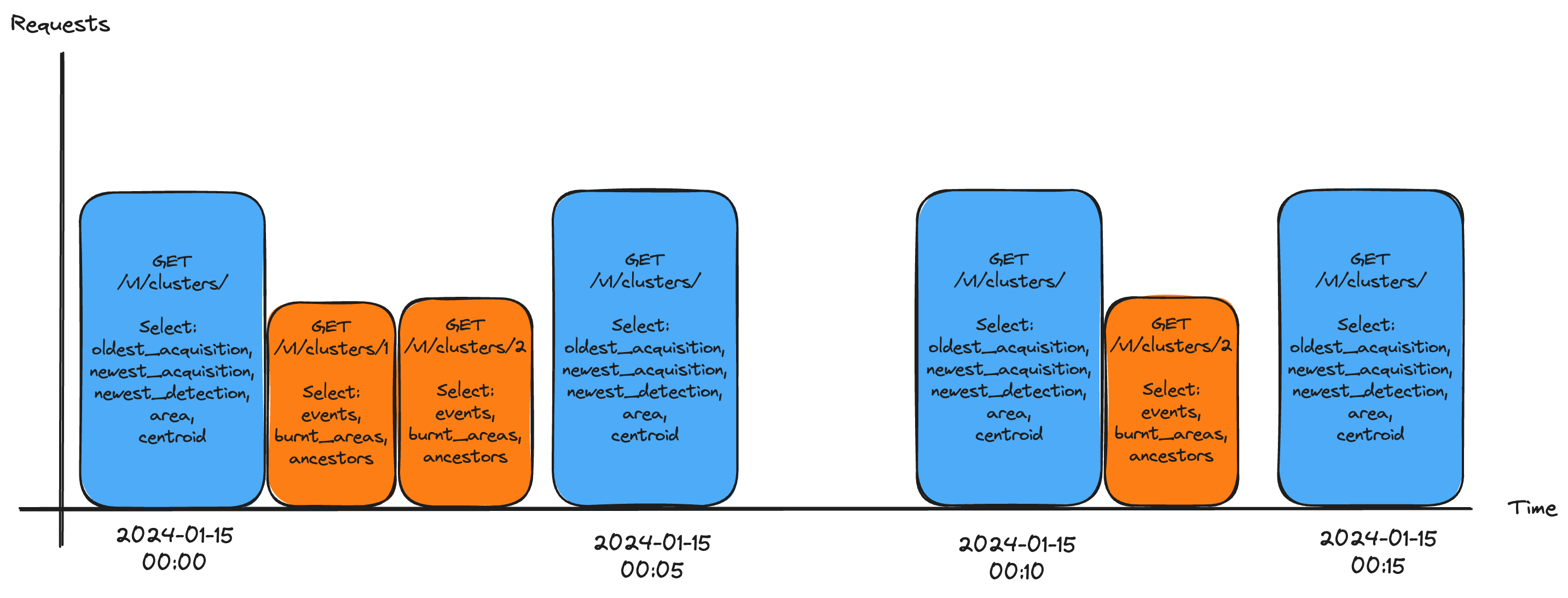
In the example above, simulating a periodic request flow, the following happens in the 4 requests made over time:
- the response to the first request contains updated information for clusters #1 and #2, which are then queried separately
- the second response does not contain any new information, so no further requests are made
- the response to the third request contains updated information for cluster #2, which is then queried separately
- the fourth response does not contain any new information, so no further requests are made
Fire Confidence threshold
Using no fire confidence filter can lead to a number of false positives. Setting min_fire_confidence=medium is less likely to include false positives. The include_no_fire_confidence parameter can be set to false to filter out clusters for which fire confidence has not yet been computed. This reduces the number of false positives even further but may also filter out early detections for which a fire confidence is not yet available.
Setting include_no_fire_confidence=true (the default) ensures that newly detected clusters for which fire confidence has not yet been computed are not silently dropped.
First detections can be critical as they provide the earliest possible information about a potential fire and can lead to the best possible response, if addressed in time. Aggressive fire confidence filters may filter out early detections.
It is up to the final user to decide whether it is worth to include early detections with low/insufficient fire confidence scores or not, depending on the use case and available resources.
Query time range
For live monitoring use-cases, it is generally recommended to query data for the last 24 hours in a specific interval. This will ensure that the shape is computed based on the most recent detections but won't include all detections for long-lived clusters.
The diagram below shows a practical example of how a response is affected by the time range parameter.
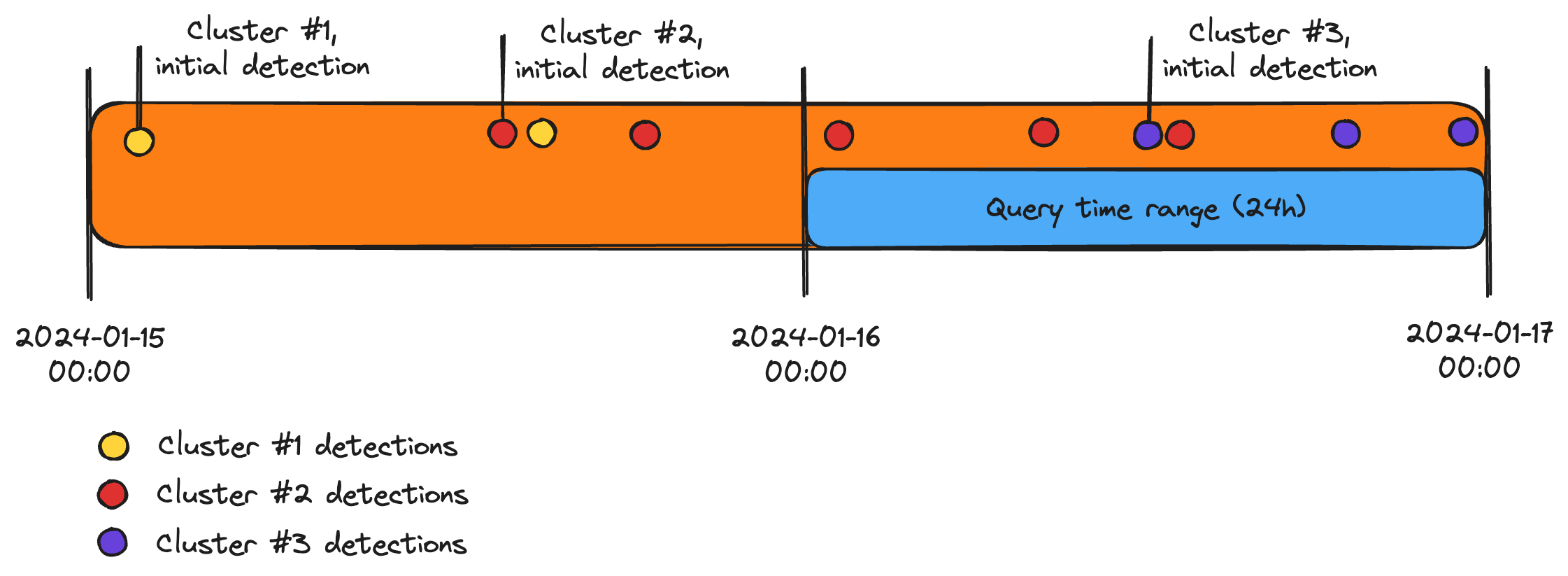
When a 24h query is run, the following results will be included in the response:
- the partial shape of cluster #2 (red), as the first 2 detections are outside the time range
- the full shape of cluster #3 (purple), as all detections are within the time range
- cluster #1 (yellow) is omitted entirely from the response, as there are no detections within the time range
If the API is queried at short intervals, a 24h time range is sufficient to capture the most recent detections effectively. In the example above, cluster #1 was already noted down previously, so it is not necessary to request that information anew. If new detections for the same cluster are detected in the past 24h, they will be included in the response automatically.
If the full shape of a cluster is relevant, then it is recommended to either extend the time range or query the cluster's details directly.
Polling interval
For near real-time monitoring, it is recommended to poll the clusters endpoint every 5-10 minutes. This interval is a good balance between the time it takes to compute the cluster shapes and the necessity for prompt updates.
If a worst-case of 5 minutes delay for new detections is not acceptable, it is recommended to use webhooks instead of polling.
Polling too often is not recommended, as it may lead to unnecessary load on the server and trigger rate limitations, without providing any real-world benefit.
Shape calculation
Cluster shapes are computed using the following logic:
- all detected hotspots for that incident are buffered by their Ground-Sampling-Distance (GSD, the pixel size of the satellite sensor)
- the buffered hotspots are then merged into a single shape
- the shape is simplified and smoothened to reduce the number of vertices
The error margin of the shape is directly related to the GSD of the satellite sensor. The smaller the GSD, the more accurate the shape will be.
Generally speaking, the final fire perimeter tends to be smaller in reality than the computed shape, due to the mentioned error.
The API returns by default a worst-case shape (which includes the full error margin). If a more optmisitic shape is desired, the shape_options=optimized parameter can be passed to the request.
The comparison below shows the difference between the worst-case and the optimized shapes for a cluster:
| Worst-case shape | Optimized shape |
|---|---|
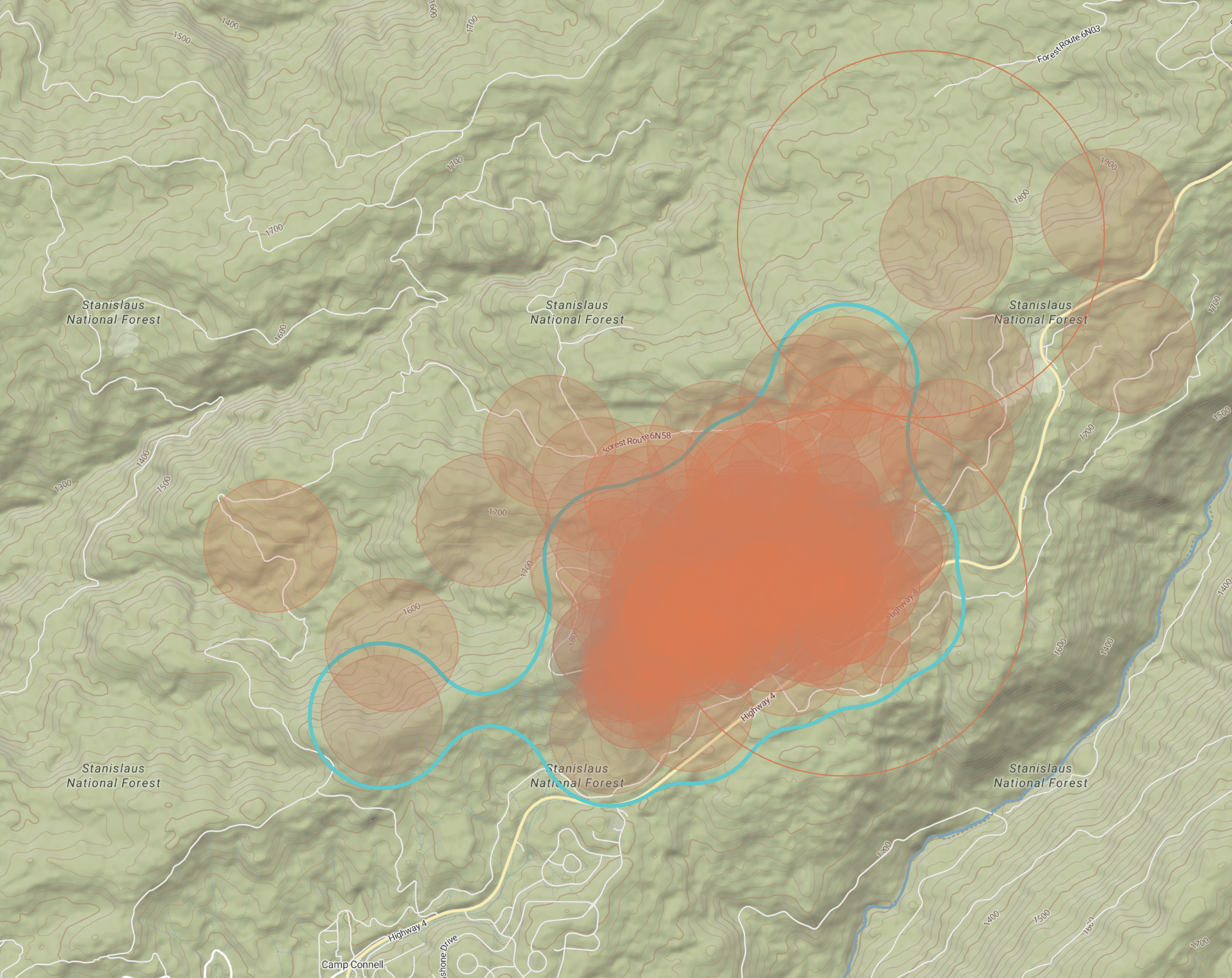 | 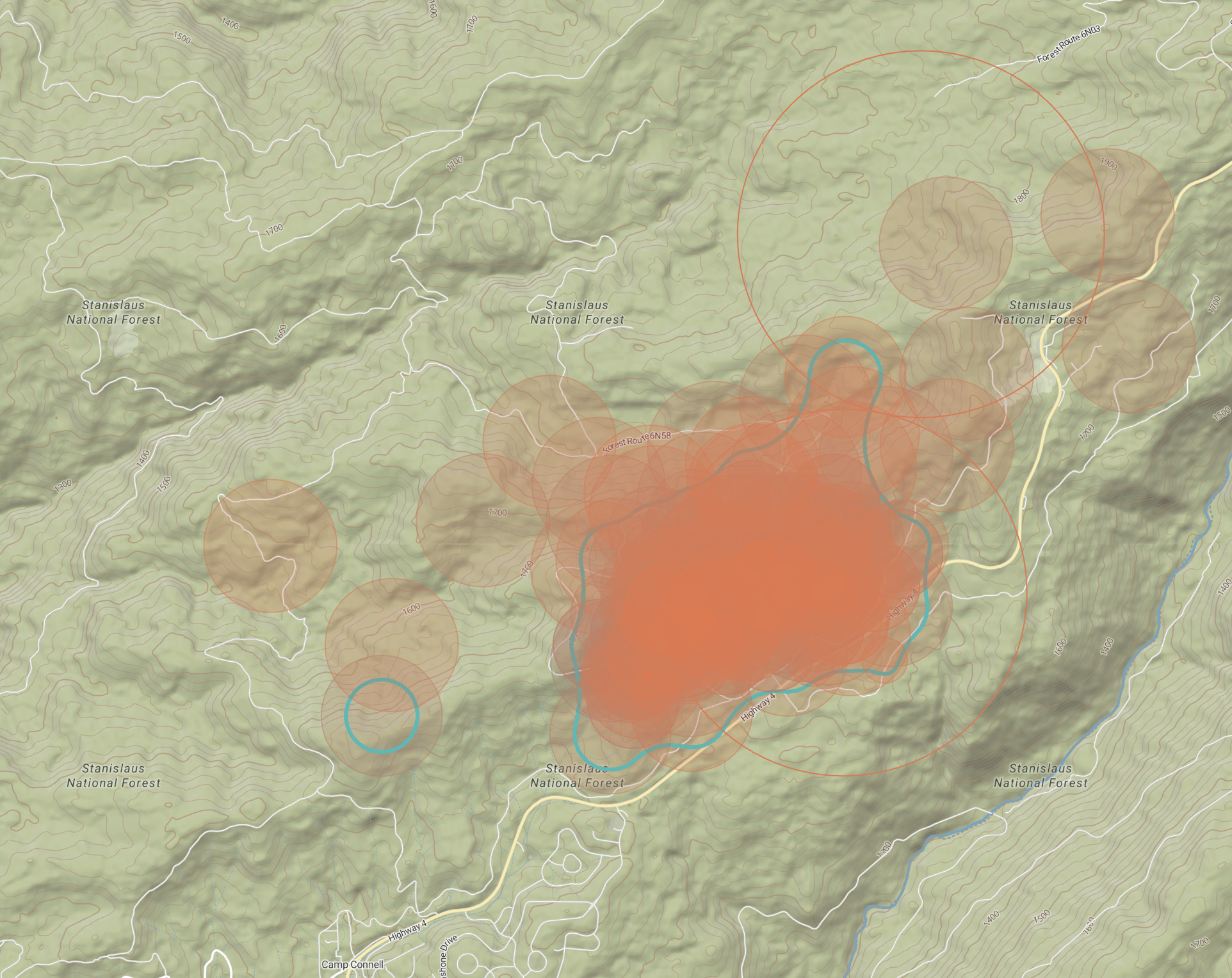 |
The affected area property of a cluster changes based on the shape calculation options. The worst-case shape will include the full error margin, while the optimized shape will be smaller.
The example above shows how some hotspots are not included in the final cluster shape. These are either GEO detections or detections with low geolocation accuracy.
To include ALL detections, the shape_options=low_accuracy parameter can be passed to the request, along with the orbit_type=LEO,GEO parameter.